
Defend yourself with common sense


NONSTOP Security Hotline
We’re here to help at any time with online fraud, suspicious phone calls, or blocking your card if it’s been lost, stolen or misused.
+420 495 800 111Contacts and information for the deaf and hard of hearing here.
Current threats
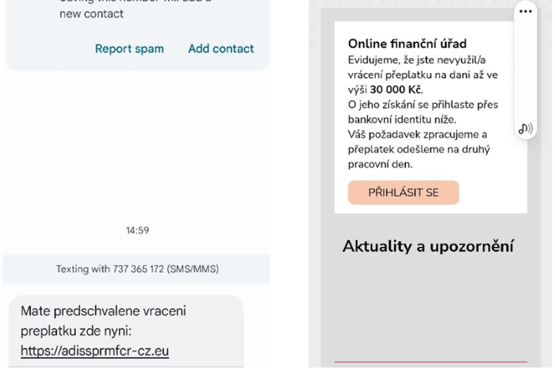
Vlna falešných SMS o přeplatcích na daních už se valí
Už je to zase tady. Lidi teď řeší daňová přiznání, čehož se snaží zneužít každoroční vlna podvodných SMS. Zprávy slibují vrácení přeplatku na daních, jejich skutečným účelem je ale připravit vás o peníze.
Learn more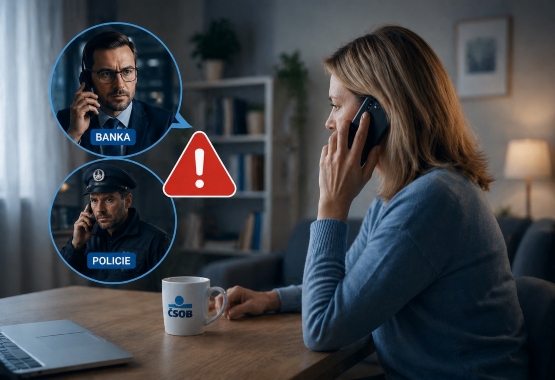
If you hear these phrases on the phone, hang up
Scammers call tens of thousands of people across the country every day. They often claim that someone is applying for a loan in your name. Although they change the details of the story each time, they use a few key phrases over and over again. Do you recognise them all?
Learn more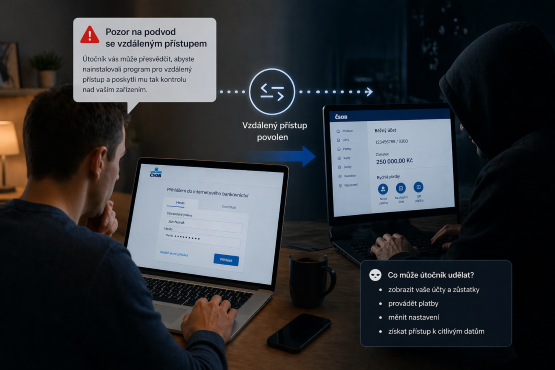
A scam that alters what you see on the web
Some scams are dangerous precisely because they look completely trustworthy. Attackers can persuade you to install remote access software – thereby handing over control of your device to them. This tool allows them to fake, for example, your account balance or an incoming payment – and they will claim that this is your return on their “investment offer”.
Learn moreTrusted email domains

@csob.cz, @servis.csob.cz, @vase.csob.cz, @novinky.csob.cz, @csobleasing.cz, @servis.csobleasing.cz, @vas.csobleasing.cz, @csobstavebni.cz, @servis.csobstavebni.cz, @vase.csobstavebni.cz, @servisFT.csob.cz, @vaseFT.csob.cz, @IT.csob.cz, @csobhypotecni.cz.
Online Safety Tips
Don't give out your PINs and passwords to anyone – not to the bank, not to the police, not to anyone.

Stay calm – scammers push you to make quick decisions, but take your time.

Check where you log in, what you pay for and what you confirm – be attentive to logins, payments and confirmations.

Don't believe fairy tales and don't let strangers into your computer – promises of getting rich without any work are a scam, as is remote access via AnyDesk or TeamViewer.

FAQ
How do I know and verify if I have been contacted by a scammer?
If someone is pressuring you to make a quick decision or asking for information the bank never requests (passwords, PINs, codes), it could be fraud. If you find yourself in this situation, you can verify everything safely – either in person at a branch, by calling us at +420 495 800 111, or by requesting a callback in the Smart Application. During the call, you can also ask the bank employee to send a verification request to your Smart Key, so you don't have to share any sensitive information over the phone.
How do I know that I can trust the message from the bank?
Our official reports are free of grammatical errors and come from the domains listed on our website. The bank will never ask you to enter your password via a link in a text or email.
What should I do if I have provided personal information on a fraudulent page?
If this happens, please contact us immediately at +420 495 800 111 and change your password. Reacting quickly allows us to work effectively with you to prevent the loss of your money. In general, there is a higher degree of certainty that you are actually sending your information to the bank when you use the app compared to a web browser. While Internet Banking is secure, it is what fraudsters primarily try to copy and fraud is more difficult to detect in these cases. Always access the bank using its official website (čsob.cz), not via search engines or links received in text messages and emails.
How do I recognize malware on my phone?
Malware slows down your device. Unfamiliar icons and excessive advertising appear and there is high data consumption. We recommend using antivirus software and installing apps only from official stores – Apple Store and Google Play.
How do I recognize a fake e-shop or payment gateway?
Always check the HTTPS in the address and the correct site name (e.g. beware of the replacement of csob.cz with csoob.cz). Red flags are extremely low prices, missing contact details (IČO – Company ID number) or the inability to pay by card.
Can a QR code be dangerous?
Yes. A fraudulent QR code can direct you to a fake payment gateway or download a virus to your phone. Only scan codes from trusted sources and always check where the link takes you in the app beforehand.
How do I know my personal data has been leaked?
The first sign is suspicious activity, including notification of a password change you haven't made. You can check your data against databases like Have I Been Pwned and immediately change your passwords to strong and unique ones in the event of a leak. However, if you have any suspicions, always contact your bank at +420 495 800 111.
Is it safe to use biometrics (fingerprint, face)?
Yes. Biometrics are generally more secure than passwords because the data is stored directly in the secure chip of your device. For the highest security, we recommend combining biometrics with another element, such as a PIN.
What should I do if someone has sent me money and wants to return it elsewhere?
It may be an attempt to engage you in money laundering. Do not send the money yourself and contact the bank immediately to have the situation safely investigated and resolved.
Is a plastic or tokenised card more secure?
The safest option is a card in your mobile device (Apple Pay / Google Pay). When you pay, your actual card number isn’t used — instead, a security token linked to your specific device is used, and everything is protected by your fingerprint or face recognition. A plastic card is also safe, but the information on it can be copied more easily. That’s why we recommend using contactless payments whenever possible, as they are safer than inserting your card into a payment terminal or ATM.
Partnerships
